Thursday, September 17, 2009


Install Windows XP


Published: September 7, 2006


Most new computers come with Windows XP installed, so many people never have to install it. However, you may need to install Windows XP if:


•


You replaced your hard disk drive with a new hard disk drive that does not have Windows XP installed.

•


You are reinstalling Windows XP on a computer because you want to clean off your hard drive and remove any unwanted programs, such as spyware.

•


You purchased a computer without an operating system.


Fortunately, you do not need to be a computer expert to install Windows XP. Installing Windows XP is a straightforward process that takes between one to two hours. Of that time, you need to be present for only about 30 minutes.


•


Pre-installation checklist

•


Install Windows XP


Note: If you have a computer with an older operating system, such as Windows 98, Windows ME, or Windows 2000, you should upgrade to Windows XP instead of performing a clean installation.


Pre-installation checklist


Before you begin the installation process, use this checklist to make sure that you are prepared:

Check


You have the Windows XP CD.

Check


You have the product key available. The product key is located on your Windows XP CD case and is required to install and activate Windows XP.

Check


Your computer hardware is set up. At a minimum, you should connect your keyboard, mouse, monitor, and CD drive. If available, you should connect your computer to a wired network.

Check


You have Windows XP drivers available. Drivers are software that Windows XP uses to communicate with your computer’s hardware. Most new computers include a CD containing drivers. If you do not have drivers available, Windows XP may already include drivers for your hardware. If not, you should be able to download them from your hardware manufacturer’s Web site after you set up Windows XP.

Check


If you are reinstalling Windows XP on an existing computer, you need a backup copy of your files and settings. The installation process will delete all of your files. You can use the File and Settings Transfer Wizard to store your files and settings on removable media and then restore them after installation is complete.


Installation process


Installing Windows XP can take up to two hours. To make the process more manageable, it has been broken up into several sections. When you are ready, install Windows XP:


Part 1: Begin the installation


1.


Insert the Windows XP CD into your computer and restart your computer.


2.


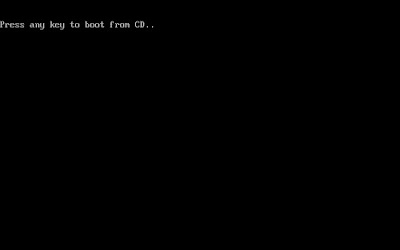
If prompted to start from the CD, press SPACEBAR. If you miss the prompt (it only appears for a few seconds), restart your computer to try again.


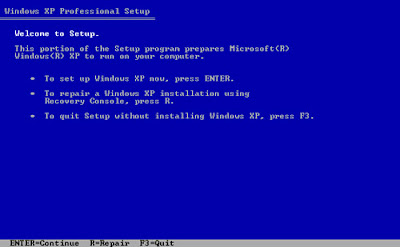
3. Windows XP Setup begins. During this portion of setup, your mouse will not work, so you must use the keyboard. On the Welcome to Setup page, press ENTER.

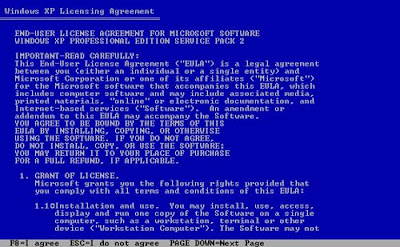
4. On the Windows XP Licensing Agreement page, read the licensing agreement. Press the PAGE DOWN key to scroll to the bottom of the agreement. Then press F8.


Installation Process of Linux

Linux Installation, Step by Step

If you have come directly to this page hoping to install Linux without doing any more reading, I suggest that you reconsider. Without the proper knowledge and preparation, attempting to install any operating system (whether Linux or any other) can be a disaster. So before I launch into the resources for your step by step Linux installation, here are some things you should already have read:

Before You Begin... I have created a backgrounder for new users in the form of several brief articles that cover the bare necessities of technical skills required to install Linux. You should read through the articles before you install, and make sure you understand all the concepts involved. The articles also cover in detail the several preparatory steps required before you install, which are often missing from other documentation.

Each Linux installation has its own setup utility, every one vastly different from all the others. This makes it very difficult if not impossible to write a step by step Linux installation manual. The closest thing in existence is the Linux Installation and Getting Started Guide, which should be included in HTML format with every Linux distribution, and is available online thanks to the Linux Documentation Project. This book contains a fairly good comparison of the major distributions and an outline of the installation process for each one. It also covers the basic technical concepts you need to understand during installation, and covers some issues of usability following your install. I highly recommend that new users at least skim through this book, and preferably absorb every word.

Also well worth the time it takes to read it is the Linux Installation HOW-TO. This document will give you some invaluable background knowledge about what is involved in the installation process.

Now that you are armed with the knowledge you need, it is time to present you with your map to Linux. Below are links to the official installation documentation for the various Linux distributions. I had originally intended to add my own reviews, comments and tips to this documentation, but with each vendor releasing two new versions every year, I just can't keep up.

Ubuntu Linux

Ubuntu Documentation page

Debian GNU/Linux

Installation Manual - Also the Online Support Page lists mailing lists and chat channels.

Mandriva Linux

Mandriva Documentation Page gives access to install guides for all recent versions of Mandriva in multiple languages. Wow!

Red Hat Linux

Red Hat Linux Manuals Page includes install guides for all recent versions of Red Hat Linux.

Slackware Linux

Friday, August 28, 2009

Resource-Allocation Graph
  • Process


  • Resource Type w/ 4 instances


  • Pi requests instance of Rj


  • Pi is holding an instance of Rj


QUESTION:
  • How would you know if there's a DEADLOCK based on the resource allocation graph?

ANSWER:
If graph contains no cycles => no deadlock.
If graph contains a cycle
  • if only one instance per resource type, then deadlock (meaning if the cycle goes on a single path, it will result to a DEALOCK).
  • if several instances per resource type, possibility of deadlock (meaning if the resource allocation graph has several cycles it has a POSSIBILITY for DEADLOCK).

Thursday, August 27, 2009

Unsafe State in Resource-Allocation Graph
· The RAG above is compose of 2 resources and 2 processes
· P1 holds an instance of R1
· P2 is requesting an instance of R1
· P2 holds an instance of R2
· P1 may request an instance of R2


Resource-Allocation Graph For Deadlock Avoidance

· The Resource Allocation Graph (RAG) above is composed of 2 processes and 2 resources.
· P1 holds an instance of R1
· P2 requests an instance of R1
· P1 and P2 may request an instance of R2

Resource-Allocation Graph With A Cycle But No Deadlock


  • P1 is holding an instance of R2 and requests instance of R1.
  • P2 is holding an instance of of R1.
  • P3 is holding an instance of R1 and requests instance of R2.
  • P4 is holding instance of R2.


Resource-Allocation Graph With A Deadlock

  • P1 is holding an instance of R2 and requests instance of R2 and requests instance of R1
  • P2 is holding an instance of R1 and R2 then requests of instance of R3
  • P3 is holding an instance of R3 and requests an instance of R2
  • R1 or resource 1 is composed of only one instance
  • R2 has 2 instances
  • R3 has one instance
  • R4 has 3 instances

Example of Resource-Allocation Graph

  • P1 is holding an instance of R2 and requests instance of R1.
  • P2 is holdng an instsnce of R1 and R2 ang requests of instance of R3.
  • P3 is holding an instance of R3.

Thursday, August 20, 2009

Recovery or Deadlock Recovery

  • Abort all deadlock processes and release resource - too drastic - will lead to loss of work
  • Abort one process at a time - releasing resources until no deadlock
    How do we determine which process to abort first ? - priority ordering, process which has done least work
  • Selectively restart processes from a previous checkpoint i.e. before it claimed any resources
    difficult to achieve - sometimes impossible
  • Successively withdraw resources from a process and give to another process until deadlock is broken. How to choose which processes and which resources ?

  1. Complex decisions due to the large number of processes present within a system
  2. Difficult to automate
  3. Use Operator to resolve conflicts - BUT this requires the operator to have skill and understanding of what processes are actually doing
Process Termination:
· Abort all deadlocked processes.
· Abort one process at a time until the deadlock cycle is eliminated.
· In which order should we choose to abort?
 - Priority of the process.
 - How long process has computed, and how much longer to completion.
 - Resources the process has used.
 - Resources process needs to complete.
 - How many processes will need to be terminated.
 - Is process interactive or batch?

Resource Preemption

· Selecting a victim – minimize cost.
· Rollback – return to some safe state, restart process for that state.
· Starvation – same process may always be picked as victim, include
number of rollback in cost factor.
Deadlock Detection

In Operating Systems a special resource-allocation graph algorithm can be used to detect whether there is any deadlock in the system. A resource-allocation graph is a directed graph consisting of two different types of nodes P = P1, P2,..., Pn, the set consisting of all active processes in the system, and R = R1, R2,..., Rm, the set consisting of all resource types in the system.

A directed edge from process Pi to resource Rj is denoted by Pi $ \longrightarrow$ Rj and means that process Pi requested an instance resource type Rj, and is currently waiting for that resource. A directed edge from resource type Rj to process Pi, is denoted by Rj $ \longrightarrow$ Pi and means that an instance of resource type Rj has been allocated to process Pi.

The following figure illustrates a resource-allocation graph where processes are denoted by circles and resources by squares. Notice that if there is a circular wait among the processes, then it implies that a deadlock has occurred.


Given a resource allocation graph in which each resource type has exactly one instance, your job is to determine whether there is a deadlock in the system. In case a deadlock exists, you must also show the sequence of processes and resources involved.

Input

The input begins with a single positive integer on a line by itself indicating the number of the cases following, each of them as described below. This line is followed by a blank line, and there is also a blank line between two consecutive inputs.


We will assume that processes are named by capital letters and resources by small letters, so we limit to 26 the number of processes and/or resources. Therefore, the first line of input consists of three numbers N, M and E, respectively, the number of processes, the number of resources and the number of edges. The edges are given in the following lines as pairs of letters linked by a `-' character. Edges are separated by spaces or newlines.

Output

For each test case, the output must follow the description below. The outputs of two consecutive cases will be separated by a blank line.


The output must be `NO' if no deadlock is detected. In case a deadlock is detected, the output must be `YES' followed by the sequence or sequences of circular waits detected, one per line. If more then one sequence is found, they should all be output in increasing order of their length.

Sample Input

1

2 2 4
A-b B-a
a-A b-B

Sample Output

YES
A-b-B-a-A
Deadlock Prevention

No Preemption –
  • If a process that is holding some resources requests another resource that cannot be immediately allocated to it, then all resources currently being held are released.
  • Preempted resources are added to the list of resources for which the process is waiting.
  • Process will be restarted only when it can regain its old resources, as well as the new ones that it is requesting.
    Circular Wait – impose a total ordering of all resource types, and require that each process requests resources in an increasing order of enumeration.


Circular Wait – impose a total ordering of all resource types, and require that each process requests resources in an increasing order of enumeration.

Deadlock prevention - low device utilization and reduced system throughput.
Deadlock avoidance

  • Given the complete sequence of requests and releases for each process, we can decide for each request whether or not the process should wait.
  • For every request, the system
    tconsiders the resources currently available, the resources currently allocated, and the future requests and releases of each process, and
    decides whether the current request can be satisfied or must wait to avoid a possible future deadlock.

  1. considers the resources currently available, the resources currently allocated, and the future requests and releases of each process, and

  2. decides whether the current avoid a possible future deadlock.


Methods for handling Deadlocks

Deadlock Prevention.
  • Disallow one of the four necessary conditions for deadlock.

Deadlock Avoidance.

  • Do not grant a resource request if this allocation have the potential to lead to a deadlock.

Deadlock Detection.

  • Always grant resource request when possible. Periodically check for deadlocks. If a deadlock exists, recover from it.

Ignore the problem...
  • Makes sense if the likelihood is very low.
Deadlock Characterization


• All four conditions must existsimultaneously for deadlock to occur.
• If we can prevent any one of theconditions, we prevent deadlock

1. Mutual exclusion: only one process at a time can use a resource.

2. Hold and wait: a process holding at least one resource is waiting to acquire additional resources held by other processes.

3. No preemption: a resource can be released only voluntarily by the process holding it, after that process has Completed its task.

4. Circular wait: there exists a set {P0, P1, …, P0} of waiting processes such that P0 is waiting for a resource that is held by P1, P1 is waiting for a resource that is held by P2, …, Pn–1 waiting for a resource that is held by Pn, and P0 is waiting for a resource that is held by P0.Deadlock can arise if four conditions hold simultaneously

Saturday, August 15, 2009

Multiprocessor Scheduling

In computer science, multiprocessor scheduling is an NP-Complete optimization problem. The problem statement is: "Given a set J of jobs where job ji has length li and a number of processors mi, what is the minimum possible time required to schedule all jobs in J on m processors such that none overlap?" The applications of this problem are numerous, but are, as suggested by the name of the problem, most strongly associated with the scheduling of computational tasks in a multiprocessor environment.

  • Will consider only shared memory multiprocessor

Thursday, August 13, 2009

Real Time Scheduling

A multitasking operating system intended for real-time applications. Such applications include embedded systems (programmable thermostats, household appliance controllers), industrial robots, spacecraft, industrial control (see SCADA), and scientific research equipment.
A RTOS facilitates the creation of a real-time system, but does not guarantee the final result will be real-time; this requires correct development of the software. An RTOS does not necessarily have high throughput; rather, an RTOS provides facilities which, if used properly, guarantee deadlines can be met generally or deterministically (known as soft or hard real-time, respectively). An RTOS will typically use specialized scheduling algorithms in order to provide the real-time developer with the tools necessary to produce deterministic behavior in the final system. An RTOS is valued more for how quickly and/or predictably it can respond to a particular event than for the amount of work it can perform over a given period of time. Key factors in an RTOS are therefore a minimal interrupt latency and a minimal thread switching latency.
An early example of a large-scale real-time operating system was Transaction Processing Facility developed by American Airlines and IBM for the Sabre Airline Reservations System.


Real-Time Review

  • Real time is not just “real fast”
    Real time means that correctness of result depends on both functional correctness and time that the result is delivered
  • Soft real time
    Utility degrades with distance from deadline
  • Hard real time
    System fails if deadline window is missed
  • Firm real time
    Result has no utility outside deadline window, but system can withstand a few missed results


Type of Real-Time Scheduling

  • Dynamic vs. Static
    Dynamic schedule computed at run-time based on tasks really executing
    Static schedule done at compile time for all possible tasks
  • Preemptive permits one task to preempt another one of lower priority
  • Thread Scheduling

The thread of a parent process forks a child process. The child process inherits the scheduling policy and priority of the parent process. As with the parent thread, it is the child thread whose scheduling policy and priority will be used.

The following figure illustates the flow of creation.

Figure 1-35 Inheritance of Scheduling policy and priority

  • Each thread in a process is independently scheduled.
  • Each thread contains its own scheduling policy and priority
  • Thread scheduling policies and priorities may be assigned before a thread is created (in the threads attributes object) or set dynamically while a thread is running.
  • Each thread may be bound directly to a CPU.
  • Each thread may be suspended (and later resumed) by any thread within the process.

The following scheduling attributes may be set in the threads attribute object. The newly created thread will contain these scheduling attributes:


  • contentionscope
    PTHREAD_SCOPE_SYSTEM specifies a bound (1 x 1, kernel-spacel) thread. When a bound thread is created, both a user thread and a kernel-scheduled entity are created.
    PTHREAD_SCOPE_PROCESS will specify an unbound (M x N, combination user- and kernel-space) thread. (Note, HP-UX release 10.30 does not support unbound threads.)
  • inheritsched
    PTHREAD_INHERIT_SCHED specifies that the created thread will inherit its scheduling values from the creating thread, instead of from the threads attribute object.
    PTHREAD_EXPLICIT_SCHED specifies that the created thread will get its scheduling values from the threads attribute object.
  • schedpolicy
    The scheduling policy of the newly created thread
  • schedparam
    The scheduling parameter (priority) of the newly created thread.

Monday, August 10, 2009

Different CPU Scheduling Algorithms

  • Treats ready queue as FIFO.
  • Simple, but typically long/varying waiting time.

Shortest Job First (SJF)

  • Give CPU to the process with the shortest next burst
  • If equal, use FCFS
  • Better name: shortest next cpu burst first

Round-Robin (RR)

  • FCFS with Preemption
  • Time quantum (or time slice)
  • Ready Queue treated as circular queue

Shortest Remaining Time (SRT)
  • Preemptive version of shortest process next policy
  • Must estimate processing time

Thursday, July 30, 2009

Single Threaded Process


Multi-Threaded Process
  • Benefits of Multi-threaded Programming
Responsiveness - Parts of a program can continue running even if parts of it are blocked. Book points out that a multi-threaded web browser could still allow user interaction in one thread while downloading a gif in another thread…
*Resource Sharing – pros and cons here. By sharing memory or other resources (files, etc.) the threads share the same address space. (there are issues here…)
*Economy – since threads share resources, it is easier to co
ntext-switch threads than context-switching processes. This should be clear.
*Utilization of MP Architectures – there will be significant increases in performance in a multiprocessor system, where different threads may be runnin
g simultaneously (in parallel) on multiple processors.
*Of course, there’s never ‘a free lunch,’ as we will see later. (There’s always a cost…; nothing this good comes free.
  • User Thread
..Thread management done by user-level threads library
..Three primary thread libraries:
-POSIX Pthreads
-Win32 threads
  • Kernel Thread
*Supported by the Kernel
*Examples

-Windows XP/2000
-Solaris
-Linux
-Tru64 UNIX
-Mac OS X
  • Thread Library
Programmers need help and receive development help via thread libraries germane to specific development APIs..
*A thread library provides an API for creating and managing threads. Java has an extensive API for thread creation and management.
-There are two primary ways to implement thread libraries:
1. Provide thread library entirely in user space – no kern
el support
-All code and data structures for the library exist in user space.
-And, invoking a local function call to the library in user space is NOT a system call, but rather a local function call. (this is good).
2. Implement a kernel-level library supported by the OS.
-Here, code and data structures exist in kernel space.
-Unfortunately, in invoking a function call to the library, there is a system call to the kernel for support.
  • Multi Models

Many-to-one Model

Each user thread maps to one kernel thread
•Is this implementation good (concurrency vs. efficiency)?
–Good concurrency, why? (blocking syscall does not affect other threads)
–Expensive, why? (user-thread creation -> kernel-thread creation)
•How to have both
good concurrency and efficiency?


One-to-one Model

*Each user-level thread maps to kernel thread
*Examples
-Windows NT/XP/2000
-Linux

-Solaris 9 and later


Many-to-Many model

Many user threads are mapped to a smaller or equal number of kernel threads. –Why is this better than Many-to-one? (concurrency & multi-processor) –Why is this better than one-to-one? (efficiency) •Like one-to-one concurrency? –Two-level model.

Interprocess Communication


Inter-process communication (IPC) is a set of techniques for the exchange of data among multiple threads in one or more processes. Processes may be running on one or more computers connected by a network. IPC techniques are divided into methods for message passing, synchronization, shared memory, and remote procedure calls (RPC). The method of IPC used may vary based on the bandwidth and latency of communication between the threads, and the type of data being communicated.
There are several reasons for providing an environment that allows process cooperation:
Information sharing
Computation speedup
Modularity
Convenience
IPC may also be referred to as inter-thread communication and inter-application communication.
IPC, on par with the address space concept, is the foundation for address space independence/isolation

Direct Communication

Processes must name each other explicitly:

send (P, message) – send a message to process P receive(Q, message) – receive a message from process Q Properties of communication link-Links are established automatically A link is associated with exactly one pair of communicating processes-Between each pair there exists exactly one link-The link may be unidirectional, but is usually bi-directional

Indirect Communication


•messages sent to and received from mailboxes (or ports)
–mailboxes can be viewed as objects into which messages placed by processes and from which messages can be removed by other processes
–each mailbox has a unique ID
–two processes can communicate only if they have a shared mailbox

Synchronization

"Synchrony" redirects here. For linguistic synchrony, see Synchronic analysis (linguistics). For the X-Files episode, see Synchrony (The X-Files).
For similarly named concepts, see Synchronicity (disambiguation).
Not to be confused with data synchronization.

Synchronization or synchronisation is timekeeping which requires the coordination of events to operate a system in unison. The familiar conductor of an orchestra serves to keep the orchestra in time. Systems operating with all their parts in synchrony are said to be synchronous or in sync. Some systems may be only approximately synchronized, or plesiochronous. For some applications relative offsets between events need to be determined, for others only the order of the event is important.

  • Blocking Send
A blocking send can be used with a non-blocking receive, and vice-versa, e.g.,

  • Nonblocking Send
can use any mode - synchronous, buffered, standard or ready

returns as soon as possible, that is, as soon as it has posted the send. The buffer might not be free for reuse.

-Non-blocking send has the sender send the message and continue.

  • Blocking Receive

Blocking receive has the receiver block until a message is available

  • Nonblocking Receive

Non-blocking receive has the receiver receive a valid message or null.

Buffering


•the number of messages that can reside in a link temporarily
–Zero capacity - queue length 0
»sender must wait until receiver ready to take the message
–Bounded capacity - finite length queue
»messages can be queued as long as queue not full
»otherwise sender will have to wait
–Unbounded capacity
»any number of messages can be queued - in virtual space?
»sender never delayed

  • Zero Capacity

0 messagesSender must wait for receiver (rendezvous)

  • Bounded capacity

finite length of n messagesSender must wait if link full.

  • Unbounded Capacity

infinite length Sender never waits

Procedure-Consumer Example

  • Procedure

a person who produces.
»get a message block from mayproduce
»put data item in block
»send message to mayconsume

  • Consumer

a person or thing that consumes.
»get a message from mayconsume
»consume data in block
»return empty message block to mayproduce mailbox

Thursday, July 16, 2009

  • Cooperating Processes

Independent process cannot affect or be affected by the execution of another process.-Cooperating process can affect or be affected by the execution of another process-Advantages of process cooperation-Information sharing-Computation speed-up-Modularity-Convenience

  • Interprocess Communication

Inter-process communication (IPC) is a set of techniques for the exchange of data among multiple threads in one or more processes. Processes may be running on one or more computers connected by a network. IPC techniques are divided into methods for message passing, synchronization, shared memory, and remote procedure calls (RPC). The method of IPC used may vary based on the bandwidth and latency of communication between the threads, and the type of data being communicated.
There are several reasons for providing an environment that allows process cooperation:
Information sharing
Computation speedup
Modularity
Convenience
IPC may also be referred to as inter-thread communication and inter-application communication.
IPC, on par with the address space concept, is the foundation for address space independence/isolation.

The Concept of Process


  • Processes are among the most useful abstractions in operating systems (OS) theory and design, since they offer a unified framework to describe all the various activities of a computer as they are managed by the OS. The term process was (allegedly) first used by the designers of Multics in the '60s, to mean something more general than a job in a multiprogramming environment. Similar ideas, however, were at the heart of many independent system design efforts at the time, so it's rather difficult to point at one particular person or team as the originator of the concept.
    As is common for concepts discovered and re-discovered many times on the field before being put on theory books, several definitions have been proposed for the term process, including picturesque ones like ``the animated spirit of a program''. We'd rather draw upon the very general ideas of system theory instead, and regard a process as a representation of the state of an instance of a program in execution.
    In this definition, the word instance (also ``image'', ``activation'') refers to the fact that in a multiprogramming environment several copies of the same program (or of a piece of executable common to different programs) may be concurrently executed by different users or applications. Instead of mantaining in main memory several copies of the executable code of the program, it is often possible to store in memory just one copy of it, and mantain a description of the current status (program counter position, values of the variables, etc.) of each executing activation of it. Main memory usage is in this way maximized. This tecnique is called code reentrance, and its implementation requires both careful crafting of the reentrant routines, whose instructions constitute the permanent part of the activation, and provisions in the OS in order to mantain an activation record of the temporary part relative to each activation, such as program counter value, variable values, a pointer back to the calling routine and to its activation record,etc.
    Similarly to the way in which activation records allow distinguishing between different activations of the same piece of executable code, by mantaining information about their status, a process description allow an OS to manage, without ensuing chaos, the concurrent execution of different programs all sharing the same resources in terms of processors, memory, peripherals. Again, the keyword here is state i.e., in system theory parlance, all the information that, along with the knowledge of the current and future input values, allows predicting the evolution of a deterministic system like a program.
    What information is this? Obviously the program's executable code is a part of it, as is the associated data needed by the program (variables, I/O buffers, etc.), but this is not enough. The OS needs also to know about the execution context of the program, which includes -at the very least- the content of the processor registers and the work space in main memory, and often additional information like a priority value, whether the process is running or waiting for the completion of an I/O event, etc.
    Consider the scheme in Fig. 1, which depicts a simple process implementation scheme. There are two processes, A and B, each with its own instructions, data and context, stored in main memory. The OS maintains, also in memory, a list of pointers to the above processes, and perhaps some additional information for each of them. The content of a ``current process'' location identifies which process is currently being executed. The processor registers then contain data relevant to that particular process. Among them are the base and top adrresses of the area in memory reserved to the process: an error condition would be trapped if the program being executed tried to write in a memory word whose address is outside those bounds. This allows process protectin and prevents unwanted interferences. When the OS decides, according to a predefined policy, that time has come to suspend the current process, the whole process registers content would be saved in the process's context area, and the registers would be restored with the context of another process. Since the program counter register of the latter process would be restored too, execution would restart automatically from the previous suspension point.


  • Process State

The process state consist of everything necessary to resume the process execution if it is somehow put aside temporarily. The process state consists of at least following:

  • Code for the program.
  • Program's static data.
  • Program's dynamic data.
  • Program's procedure call stack.
  • Contents of general purpose registers.
  • Contents of program counter (PC)
  • Contents of program status word (PSW).
  • Operating Systems resource in use.


  • Process Control Block

A Process Control Block (PCB, also called Task Control Block or Task Struct) is a data structure in the operating system kernel containing the information needed to manage a particular process. The PCB is "the manifestation of a process in an operating system".[1]

Included information
Implementations differ, but in general a PCB will include, directly or indirectly:
The identifier of the process (a process identifier, or PID)
Register values for the process including, notably,
the Program Counter value for the process
The address space for the process
Priority (in which higher priority process gets first preference. eg., nice value on Unix operating systems)
Process accounting information, such as when the process was last run, how much CPU time it has accumulated, etc.
Pointer to the next PCB i.e. pointer to the PCB of the next process to run
I/O Information (i.e. I/O devices allocated to this process, list of opened files, etc)
During a context switch, the running process is stopped and another process is given a chance to run. The kernel must stop the execution of the running process, copy out the values in hardware registers to its PCB, and update the hardware registers with the values from the PCB of the new process.

  • Threads
For the form of code consisting entirely of subroutine calls, see Threaded code. For the collection of posts, see Internet forum#Thread.

A process with two threads of execution.
In computer science, a thread of execution results from a fork of a computer program into two or more concurrently running tasks. The implementation of threads and processes differs from one operating system to another, but in most cases, a thread is contained inside a process. Multiple threads can exist within the same process and share resources such as memory, while different processes do not share these resources.
On a single processor, multithreading generally occurs by time-division multiplexing (as in multitasking): the processor switches between different threads. This context switching generally happens frequently enough that the user perceives the threads or tasks as running at the same time. On a multiprocessor or multi-core system, the threads or tasks will generally run at the same time, with each processor or core running a particular thread or task. Support for threads in programming languages varies: a number of languages simply do not support having more than one execution context inside the same program executing at the same time. Examples of such languages include Python, and OCaml, because the parallel support of their runtime support is limited by the use of a central lock, called "Global Interpreter Lock" in Python, "master lock" in Ocaml. Other languages may be limited because they use threads that are user threads, which are not visible to the kernel, and thus cannot be scheduled to run concurrently. On the other hand, kernel threads, which are visible to the kernel, can run concurrently.
Many modern operating systems directly support both time-sliced and multiprocessor threading with a process scheduler. The kernel of an operating system allows programmers to manipulate threads via the system call interface. Some implementations are called a kernel thread, whereas a lightweight process (LWP) is a specific type of kernel thread that shares the same state and information.
Programs can have user-space threads when threading with timers, signals, or other methods to interrupt their own execution, performing a sort of ad-hoc time-slicing.


Process Scheduling


  • Scheduling Queues

Job queue – set of all processes in the system.

Ready queue – set of all processes residing in main memory, ready and waiting to execute.

Device queues – set of processes waiting for an I/O device. Process migration between the various queues. Representation of Process Scheduling


  • Schedulers

Scheduling is a key concept in computer multitasking and multiprocessing operating system design, and in real-time operating system design. In modern operating systems, there are typically many more processes running than there are CPUs available to run them. Scheduling refers to the way processes are assigned to run on the available CPUs. This assignment is carried out by software known as a scheduler.


The scheduler is concerned mainly with:
CPU utilization - to keep the CPU as busy as possible.
Throughput - number of process that complete their execution per time unit.
Turnaround - amount of time to execute a particular process.
Waiting time - amount of time a process has been waiting in the ready queue.
Response time - amount of time it takes from when a request was submitted until the first response is produced.
Fairness - Equal CPU time to each thread.
In real-time environments, such as mobile devices for automatic control in industry (for example robotics), the scheduler also must ensure that processes can meet deadlines; this is crucial for keeping the system stable. Scheduled tasks are sent to mobile devices and managed through an administrative back end.


  • Context Switch

For other uses, see Switch (disambiguation).
A context switch is the computing process of storing and restoring the state (context) of a CPU such that multiple processes can share a single CPU resource. The context switch is an essential feature of a multitasking operating system. Context switches are usually computationally intensive and much of the design of operating systems is to optimize the use of context switches. A context switch can mean a register context switch, a task context switch, a thread context switch, or a process context switch. What constitutes the context is determined by the processor and the operating system.


Contents
1 When to switch?
1.1 Multitasking
1.2 Interrupt handling
1.3 User and kernel mode switching
2 Context switch: steps
3 Software vs hardware context switching
4 External links

Operation on Processes

  • Process Creation

Nachos processes are formed by creating an address space, allocating physical memory for the address space, loading the contents of the executable into physical memory, initializing registers and address translation tables, and then invoking machine::Run() to start execution. Run() simply ``turns on'' the simulated MIPS machine, having it enter an infinite loop that executes instructions one at a time).
Stock Nachos assumes that only a single user program exists at a given time. Thus, when an address space is created, Nachos assumes that no one else is using physical memory and simply zeros out all of physical memory (e.g., the mainMemory character array). Nachos then reads the binary into physical memory starting at location mainMemory and initializes the translation tables to do a one-to-one mapping between virtual and physical addresses (e.g., so that any virtual address N maps directly into the physical address N). Initialization of registers consists of zeroing them all out, setting PCReg and NextPCReg to 0 and 4 respectively, and setting the stackpointer to the largest virtual address of the process (the stack grows downward towards the heap and text). Nachos assumes that execution of user-programs begins at the first instruction in the text segment (e.g., virtual address 0).
When support for multiple user processes has been added, two other Nachos routines are necessary for process switching. Whenever the current processes is suspended (e.g., preempted or put to sleep), the scheduler invokes the routine AddrSpace::SaveUserState(), in order to properly save address-space related state that the low-level thread switching routines do not know about. This becomes necessary when using virtual memory; when switching from one process to another, a new set of address translation tables needs to be loaded. The Nachos scheduler calls SaveUserState() whenever it is about to preempt one thread and switch to another. Likewise, before switching to a new thread, the Nachos scheduler invokes AddrSpace::RestoreUserState. RestoreUserState() insures that the proper address translation tables are loaded before execution resumes.

  • Process Termination

When a process finishes executing, HP-UX terminates it using the exit system call.
Circumstances might require a process to synchronize its execution with a child process. This is done with the wait system call, which has several related routines.
During the exit system call, a process enters the zombie state and must dispose of child processes. Releasing process and thread structures no longer needed by the exiting process or thread is handled by three routines -- freeproc(), freethread(), and kissofdeath().
This section will describe each process-termination routine in turn.

Thursday, July 9, 2009

Quiz #3

What are the major activities of an Operating System with regards to process management?

  • Process creation and deletion
  • Process suspension and resumption
  • Prevision of mechanism for:
  • process synchronization
  • process communication
  • deadlock handling

What are the major activities of an Operating System with regards to memory management?

  • Keep track of which parts of memory rae currently being used by whom
  • Decide which processes to load when memory space become available
  • Allocate and Deallocate memory space as needed

What are the major activities of an Operating System with regards to secondary storage management

  • Free Space Management
  • Storage Allocation
  • Disk Scheduling

What are the major activities of an Operating System with regards to file management?

  • File creation and deletion
  • Directory creation and deletion
  • Support of primitives for manipulating files and directories
  • Mapping files onto secondary storage
  • File backup on the stable(nonvolatile storage)

What is the purpose of the command interpreter?

  • It serves as the interface between the user and the Operating System.
  • User friendly, mouse based windows environment in the Macintosh and Microsoft windows.
  • In MS-DOS and UNIX, command are typed on a keyboard and displayed on a screen or printing terminal with the Enter or Return key indicating that a command is complete and ready to be executed.